.png?width=300&height=150&name=Untitled%20design%20(2).png)
Purpose
To ensure clear, consistent, and centralized documentation of all member interactions, actions, and follow-ups in HubSpot—so any coach, VA, or leader can instantly understand a member’s history, challenges, and opportunities without digging through Slack.
HubSpot is the single source of truth.
Slack is for communication — not record-keeping.
Last updated: Mar 17, 2026 (Yhang)
Golden Rule (Non-Negotiable)
✅ ALL NOTES AND TASKS MUST BE LOGGED IN THE MEMBER’S COMPANY PROFILE
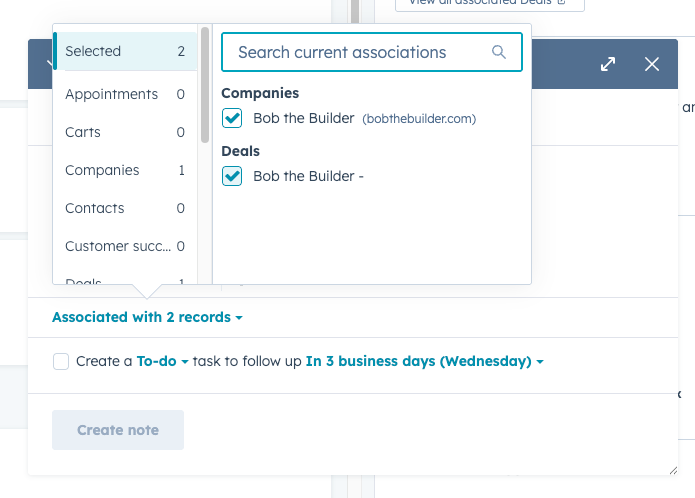
✅ Always tick / associate the relevant Contact(s) so notes and tasks sync across profiles
If it’s not in HubSpot, it didn’t happen.
Where Notes & Tasks Must Live
- Primary location: Company Profile (Member Profile)
- Also associated with:
- Primary Contact
- Secondary Contact (if applicable)
- Assigned Coach(es)
- Relevant VA(s)
- Primary Contact
This ensures:
- Full visibility across teams
- Clean member history
- Easy handovers during leave, emergencies, or reassignments
Video Training HERE & HERE
NOTES: How & When to Use
When to Create a Note
Create a HubSpot Note for:
- Post-session documentation (all types of call)
- Important member updates
- Attempted or missed calls
- Key insights, blockers, or wins
- Strategic recommendations discussed
- Anything you’d want context on 3–6 months from now
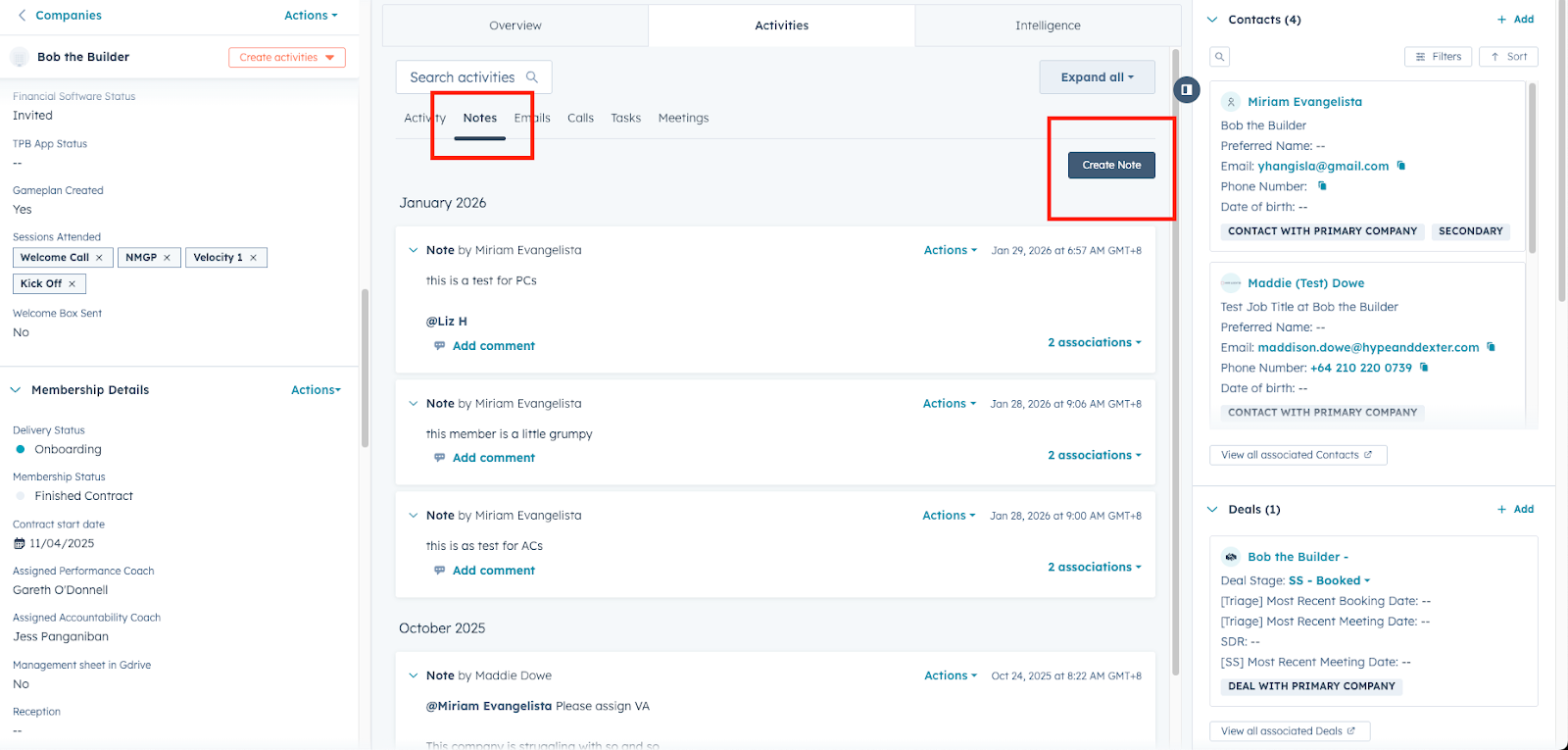
Mandatory Use Case
✅ Post-Session Notes
Video Training HERE
Performance Coaches & Accountability Coaches must log session notes in HubSpot — NOT Slack.
Slack summaries = optional
HubSpot notes = required
‼️ ALWAYS TAG the MCT Team(Orange Tuazon, Jessica Yrogirog and Yen Balaba) in ALL Post Session Notes for visibility and stats tracking
If the session was booked via Hubspot:
Leave the your post session notes as a comment in the MEETINGS
STEP 1: Go to Meetings and find the concluded session (CONTACT PROFILE, NOT company profile)
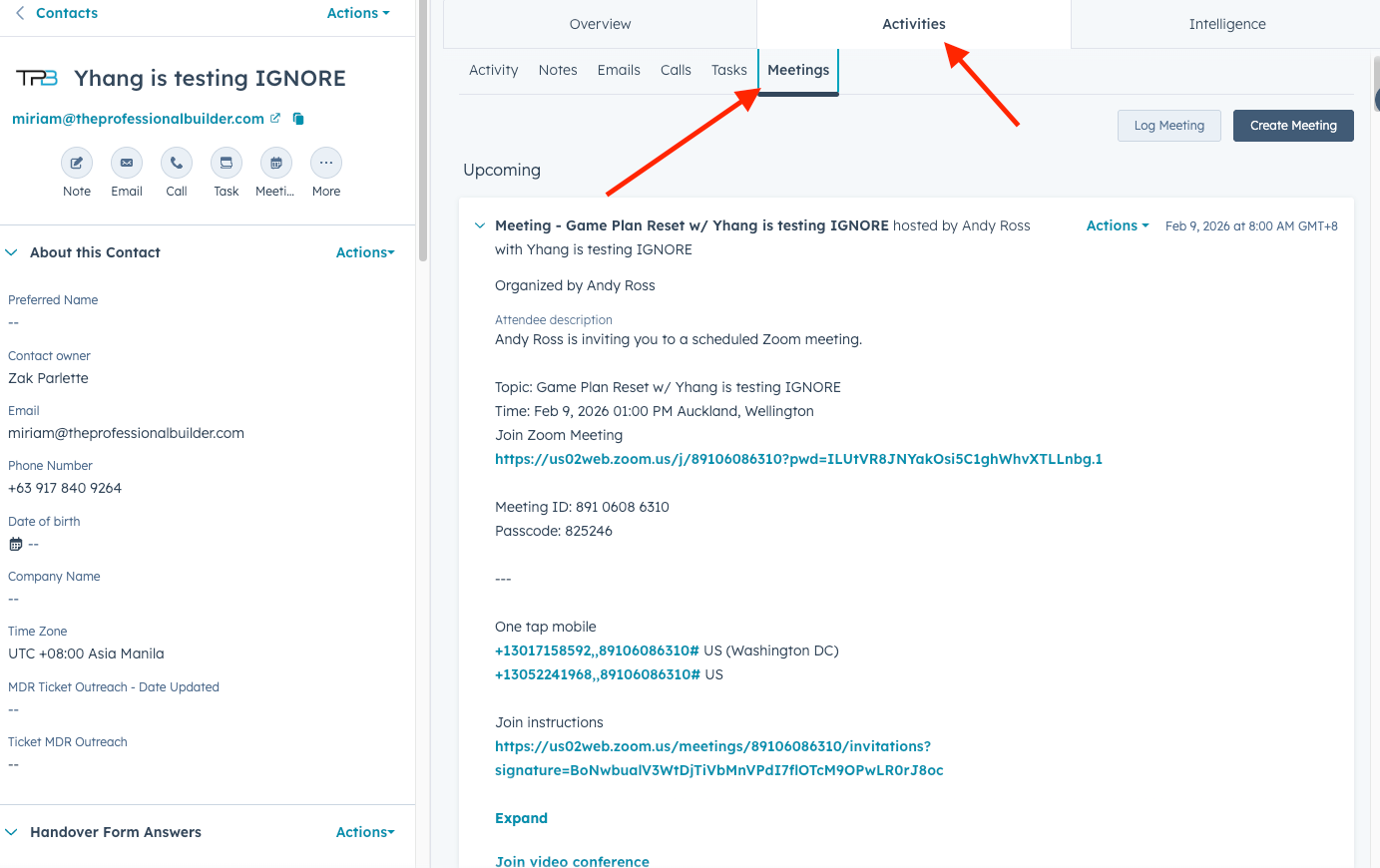
STEP 2: Click ACTION and then EDIT
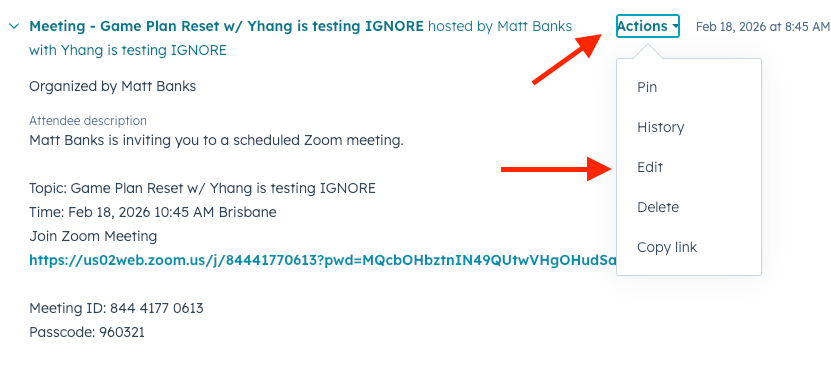
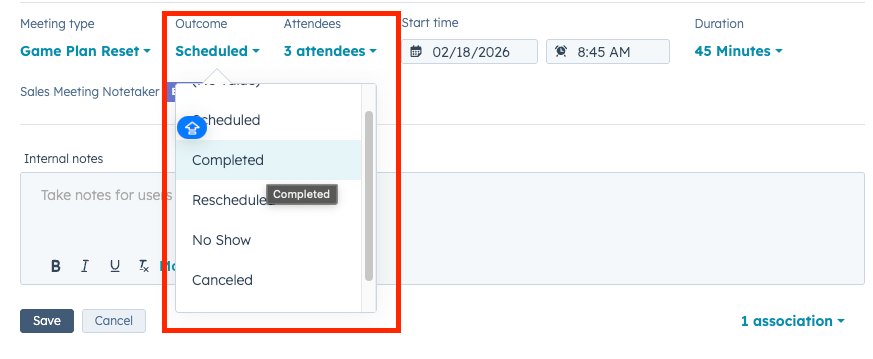
STEP 3: Update the outcome accordingly
STEP 4: Use the INTERNAL NOTES SECTION for your post session notes. Tag Orange and Jessica.
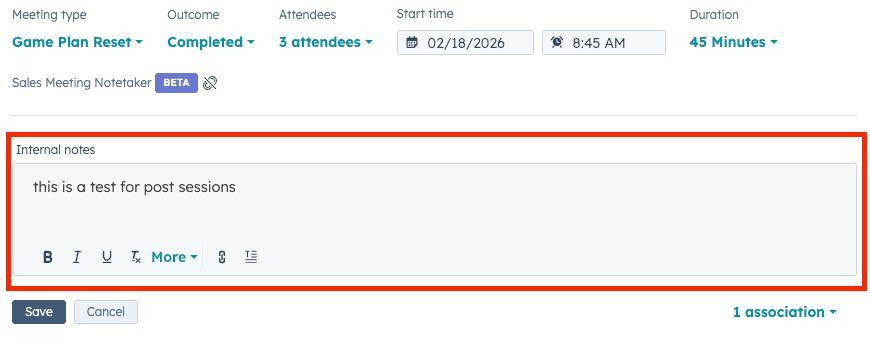
NOTE: You can also leave comments in the same meeting thread and tag people who are involved.
STEP 5: DON’T FORGET TO UPDATE ASSOCIATION and then hit save.
Tagging Guidelines
- You may tag:
- Assigned VA
- Performance / Accountability Coach
- Team Lead & Manager (if escalation or visibility is needed)
- Assigned VA
Tag only when relevant — not for FYI spam.
TASKS: How & When to Use
When to Create a Task
Use Tasks when:
- There is a clear action item
- Someone needs to do something after a call
- Follow-ups must not be forgotten
If it requires action → create a task, don’t bury it in notes.
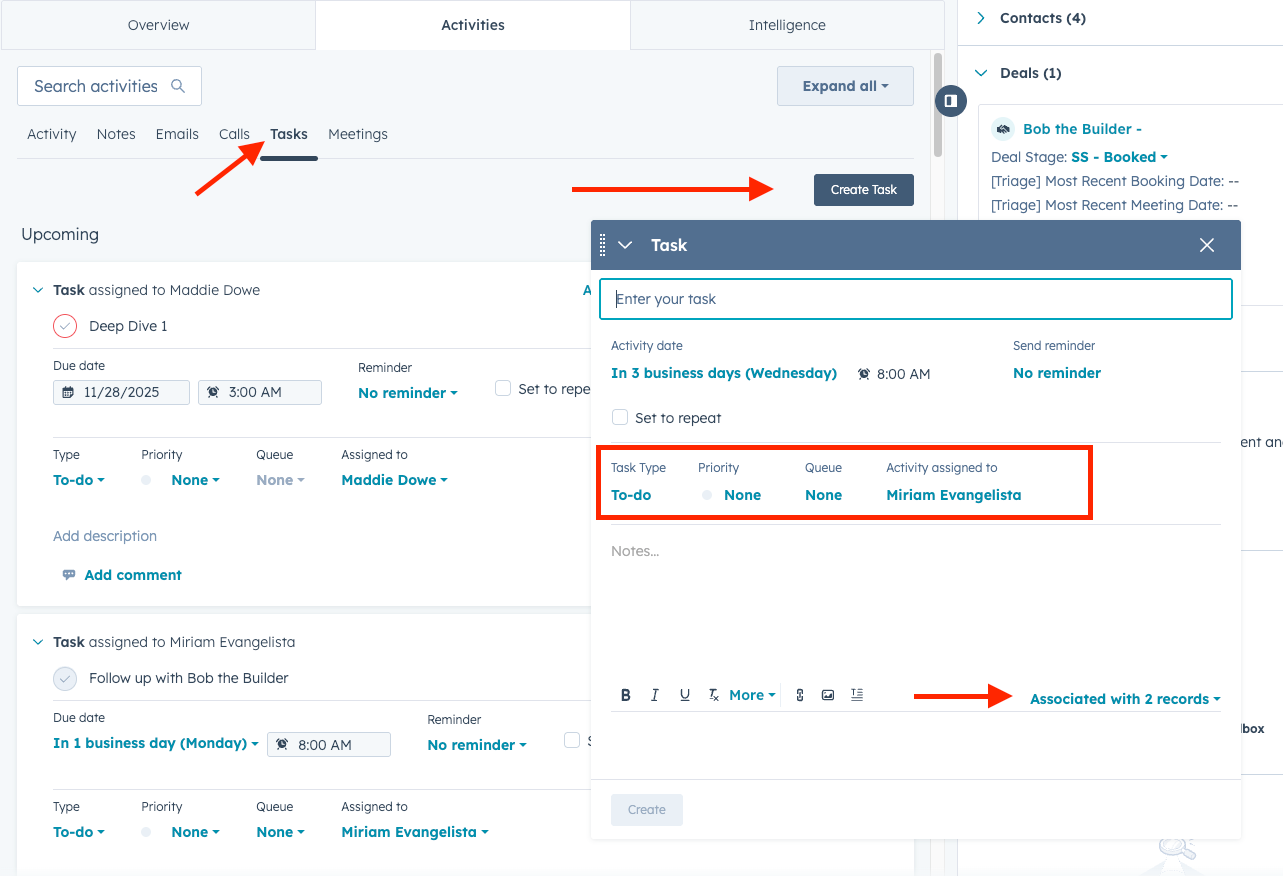
Task Best Practices
Each task must have:
- ✅ Clear action (what needs to be done)
- ✅ Assigned owner (VA, coach, or lead)
- ✅ Due date & time
- ✅ Reminder(s) if time-sensitive
- ✅ Associated Company + Contact(s)
Task Examples
- “Send recap email to member”
- “Book follow-up Game Plan session”
- “Update 90-Day Game Plan”
- “Confirm Kick-Off session attendance”
- “Follow up on missed session”
Important Reminders
- Do not assign tasks to “everyone”
- One task = one owner
- If it’s urgent, still log it in HubSpot before or after Slack follow-up
What NOT to Do
🚫 Don’t log notes only in Slack
🚫 Don’t leave notes unassociated with contacts
🚫 Don’t create vague tasks (“follow up”)
🚫 Don’t rely on memory
Why This Matters
Proper use of Notes & Tasks allows us to:
- Track full member history
- Identify patterns, risks, and opportunities
- Support members better across teams
- Maintain continuity even during leave or turnover
- Build reliable dashboards & reporting (Phase II 👀)
EXISTING AUTOMATIONS in TASKS
Welcome Call
Assigned to: Accountability Coaches
- Once the member has been updated to CLOSED WON > ACCOUNTABILITY COACH HAS BEEN ASSIGNED - a task will automatically be created in Hubspot and the assigned AC will be tagged. This is a call task and will replace the notification received in slack in #coaches-reminders.
What to do if you received a notification:
- Conduct the Call
- If the member didn’t pick up, please leave notes in the member’s profile that an attempt was made.
- Tag the MC team (Orange, Jessica, and Yen)
- If it was a successful call, leave notes accordingly and if there’s any actions that need to be done, please create a task for the VAs and tag them.
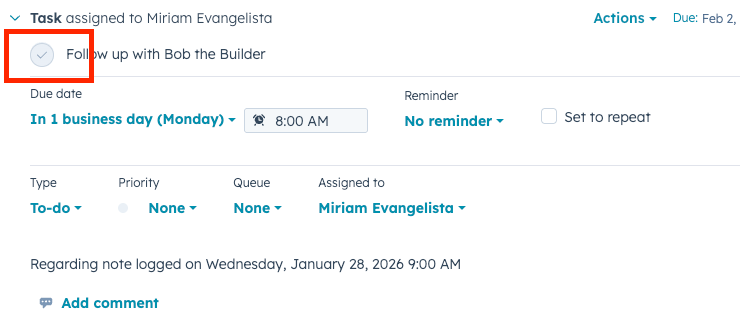
- Don’t forget to tick CHECK after the call